flowchart LR
  GA[GitHub Actions] --> docker[Docker Containers]
  docker --> webs[Web Scraping]
Automatic reports with Github Actions
PHS 7045: Advanced Programming
Intro
Today
We will review three technologies to build automatic reports based on web-scraped data:
Before we proceed, let’s take a look at the specific goal:
Webscrape PubMed to download a list of the most recent ABM papers.
The resulting report can be viewed at https://github.com/UofUEpiBio/PHS-7045-egga.
The task
PubMed
We need to extract the information from this website:
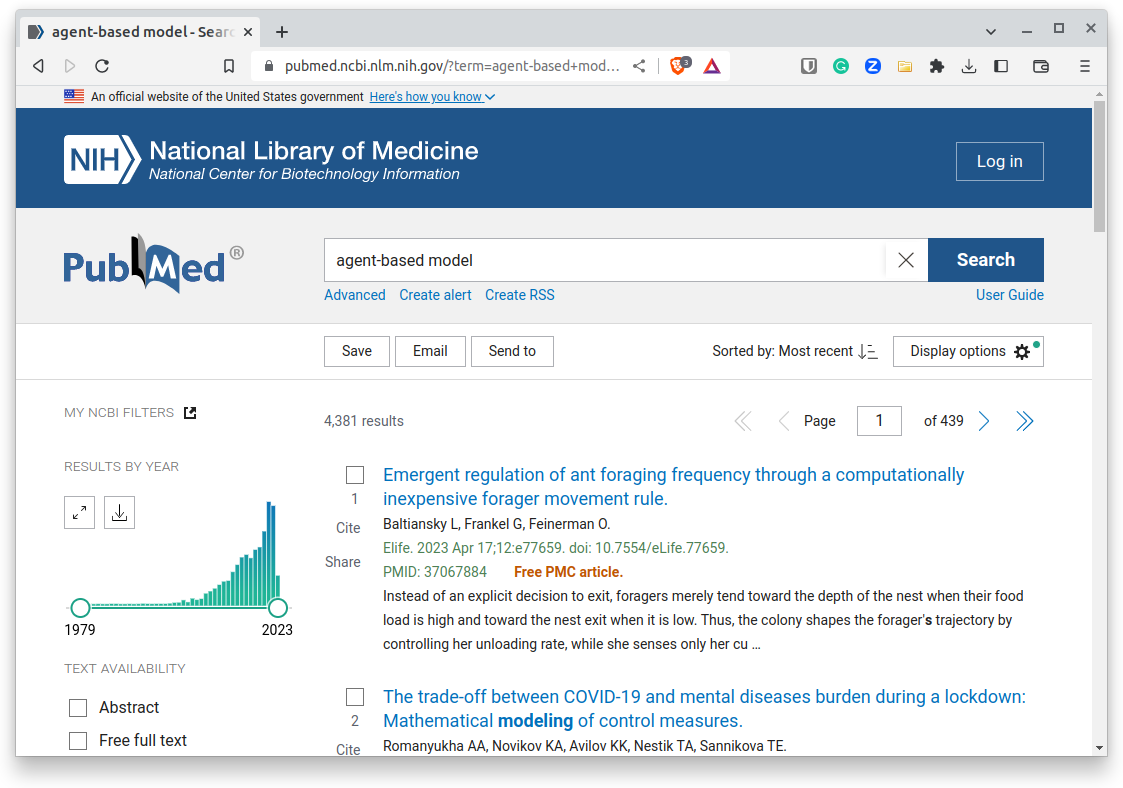
Let’s start by looking into the Quarto document used to do so. You can download it from here.
Our report
Web scraping
Fundamentals of Web Scrapping
What?
Web scraping, web harvesting, or web data extraction is data scraping used for extracting data from websites – Wikipedia
How?
The
rvestR package provides various tools for reading and processing web data.Under the hood,
rvestis a wrapper of thexml2andhttrR packages.
(in the case of dynamic websites, take a look at selenium)
Web scraping raw HTML: Example
We want to directly capture the table of COVID-19 death rates per country from Wikipedia.
library(rvest)
library(xml2)

# Reading the HTML table with the function xml2::read_html
covid <- read_html(
  x = "https://en.wikipedia.org/w/index.php?title=COVID-19_pandemic_death_rates_by_country&oldid=1117643862"
  )

# Let's see the output
covid
{html_document}
<html class="client-nojs vector-feature-language-in-header-enabled vector-feature-language-in-main-menu-disabled vector-feature-language-in-main-page-header-disabled vector-feature-page-tools-pinned-disabled vector-feature-toc-pinned-clientpref-1 vector-feature-main-menu-pinned-disabled vector-feature-limited-width-clientpref-1 vector-feature-limited-width-content-enabled vector-feature-custom-font-size-clientpref-1 vector-feature-appearance-pinned-clientpref-1 skin-theme-clientpref-day vector-sticky-header-enabled vector-toc-available skin-thumbsize-clientpref-standard skin-underline-clientpref-browser" lang="en" dir="ltr">
[1] <head>\n<meta http-equiv="Content-Type" content="text/html; charset=UTF-8 ...
[2] <body class="mediawiki ltr sitedir-ltr mw-hide-empty-elt action-view skin ...Web scraping raw HTML: Example (cont 1.)
Warning
The current version of the wikipedia document doesn’t have the proper XPath. So we will skip the example and directly call the function to retrieve the table.
We want to get the HTML table in the doc. To do such, we can use the function
xml2::xml_find_all()andrvest::html_table()The first will locate the place in the document that matches a given XPath expression.
XPath, XML Path Language, is a query language to select nodes in an XML document.
An excellent tutorial can be found here
Modern Web browsers make it easy to use XPath!
Live Example! (inspect elements in Google Chrome, Mozilla Firefox, Internet Explorer, and Safari)
Web scraping with xml2 and the rvest package (cont. 2)
Now that we know what the path is, let’s use that and extract
table <- html_table(covid)[[2]] # This returns a list of tables
head(table)
# A tibble: 6 × 4
Country `Deaths / million` Deaths Cases
<chr> <chr> <chr> <chr>
1 World[a] 894 7,117,266 779,439,160
2 Peru 6,604 221,073 4,533,878
3 Bulgaria 5,681 38,778 1,341,082
4 North Macedonia 5,429 9,991 352,093
5 Bosnia and Herzegovina 5,123 16,419 404,289
6 Hungary 5,072 49,124 2,240,966 GitHub Actions
GA: What
In simple terms: Free cloud computing time (2,000 minutes/month) on any OS, whenever you want

GA: Some examples
- Build a website using
quarto.
- Update
Dockerimages.
R CMD checkR packages (or any software) on various versions.
- Build automatic reports (like what we will be doing!).
The core component of GitHub actions is the workflow files.
GitHub Actions: Workflow
The workflow file (stored under .github/workflows)
# Workflow derived from https://github.com/r-lib/actions/tree/v2/examples
# Need help debugging build failures? Start at https://github.com/r-lib/actions#where-to-find-help
on:
  push:
    branches: [main, master]
  schedule:
    - cron: '0 0 * * 0' # https://crontab.guru/

name: Build it

jobs:
  Build:
    runs-on: ubuntu-latest
    container: rocker/tidyverse:4.2.2
    env:
      GITHUB_PAT: ${{ secrets.GITHUB_TOKEN }}
      GITHUB_REPO: ${{ github.event.repository.name }}
    steps:
      - uses: actions/checkout@v3
        with:
          fetch-depth: 0

      # Installing quarto
      - uses: quarto-dev/quarto-actions/setup@v2
        with:
          version: 0.3.71

      - name: Install packags and render
        run: |
          install2.r xml2 quarto
          quarto render README.qmd

      # There's an error with EndBug, need to use the safe.directory
      # option. More here
      # https://git-scm.com/docs/git-config#Documentation/git-config.txt-safedirectory
      - name: Dealing with GitConfig
        run: |
          git config --global --add safe.directory /__w/${GITHUB_REPO}/${GITHUB_REPO}

      - uses: EndBug/add-and-commit@v9
        with:
          add: README.md
Let’s see bit by bit
GA: Trigger
When the action triggers:
When there’s a push to the main or master branches.
And once a week, every Monday at 0 hours.
on:
  push:
    branches: [main, master]
  schedule:
    - cron: '0 0 * * 0' # https://crontab.guru/
GA: Configuration of the Jobs
It runs on the lastest version of Ubuntu
But within a container (rocker/tidyverse:4.2.2)
Build:
    runs-on: ubuntu-latest
    container: rocker/tidyverse:4.2.2
    env:
      GITHUB_PAT: ${{ secrets.GITHUB_TOKEN }}
GITHUB_REPO: ${{ github.event.repository.name }}- It sets two environment variables (accessible with the dollar sign):
GITHUB_PATandGITHUB_REPO.
GA: Steps
The Build job has five steps:
- Clone the current repository.
- Install
quartoversion 0.3.71.
- Install the
xml2andquartoR packages and render theREADME.qmddocument.
- …
- Commit the changes.
- uses: actions/checkout@v3
  with:
    fetch-depth: 0

- uses: quarto-dev/quarto-actions/setup@v2
  with:
    version: 0.3.71

- name: Install packags and render
  run: |
    install2.r xml2 quarto
    quarto render README.qmd

- name: Dealing with GitConfig
  run: |
    git config --global --add safe.directory /__w/${GITHUB_REPO}/${GITHUB_REPO}

- uses: EndBug/add-and-commit@v9
  with:
    add: README.md
Of these five steps, steps 1, 2, and 5 were pulled directly from the GA marketplace.
Docker containers
Docker: What are containers
Containers are isolated from one another and bundle their own software, libraries and configuration files; they can communicate with each other through well-defined channels.[8] Because all of the containers share the services of a single operating system kernel, they use fewer resources than virtual machines – Wiki
Docker’s Architecture

The rocker/tidyverse image
The tidyverse image
rocker/tidyverse has already installed many R packages and their dependencies apt packages. e.g. the tidyverse package, the devtools package, the rmarkdown package, some R Database Interface packages, the data.table package, the fst package, and the Apache Arrow R package. – Source: Rocker Project